The engine is real. The scenario is on you.引擎是真货,场景得你自己造。
We ran Arga Labs' Datadog twin twice on the free plan and filled it with a seven-day scenario: twelve hosts that run hot all day and come within a few percent of falling over once a day. This page grades the twin on what it did with that data, and grades our scenario on how well it held up inside it.
我们在免费套餐上把 Arga Labs 的 Datadog 孪生服务(twin)开了两次,往里面灌了一个七天的场景:十二台服务器全天高负载,每天有一次离崩溃只差几个百分点。本页评估这个孪生服务如何处理这些数据,也评估我们的场景在里面表现得怎么样。
Run 1 · 18:40–18:51 PDT第 1 次运行 · 太平洋时间 18:40–18:51Run 2 · 18:51–19:01 PDT第 2 次运行 · 18:51–19:012 of 5 quickstart provisions used快速入门密钥 5 次开通额度用了 2 次
- monitor outcomes our window model called within 10 s监控器结果中,我们的窗口模型误差在 10 秒内的比例
- 17 / 18
- metric points ingested, in 6.2–6.7 s per run写入的指标数据点,每次运行用时 6.2–6.7 秒
- 320,220
- Datadog presets, or scenario seeding supportDatadog 的预置场景或场景注入支持
- 0
- lines we wrote to make one believable week为造出可信的一周,我们写的代码行数
- 1,911
For readers who don't work in software写给完全不做软件的读者
In plain words用大白话说
Arga Labs sells practice copies of the online services that companies run on. One of them is a copy of Datadog, the tool engineers use to watch their servers and get warned when something is about to break. Teams use these copies to test their software, and their AI assistants, without touching the real thing.
Arga Labs 卖的是各种在线服务的“练习用复制品”,公司的业务就跑在这些服务上。其中一个是 Datadog 的复制品。Datadog 是工程师用来盯着服务器、在快出问题时收到警报的工具。团队用这些复制品测试自己的软件和 AI 助手,而不用碰真东西。
We rented that copy twice, ten minutes each time, and filled it with a made-up company whose computers are overloaded every day. Picture a fire drill in a building that always runs too hot, where the smoke alarm should go off once a day.
我们把这个复制品租了两次,每次 10 分钟,往里面放了一家虚构的公司:它的电脑每天都超负荷运转。可以把它想象成一场消防演练:一栋楼一直偏热,烟雾报警器每天应该响一次。
For us, matching how accurate their alarms are is the price of entry. The room to win is in what they leave to the customer: ready-made stories of things going wrong, control over time, a strict copy that behaves exactly like the real service, and screens a person can read.
对我们来说,把警报做到和他们一样准,只是入场门票。真正能赢的地方,是他们留给客户自己去做的部分:现成的“出问题”剧本、对时间的控制、一个和真实服务行为完全一致的严格版复制品,以及人能看懂的界面。
How the twin scored孪生服务的评分
Grades come from the two runs above. Strong means it worked and behaved like Datadog. Mixed means it worked with deviations. Gap means a missing capability, or a difference that changes results.
评分来自上面两次运行。强:能用,而且行为和 Datadog 一致。一般:能用,但有偏差。缺口:缺少某项能力,或者存在会改变结果的差异。
Monitor evaluation监控器评估
Strong强Evaluates each metric monitor over its full window (avg(last_5m), max(last_15m)), per host or per service, about every 10 seconds. It writes its own [Monitor Warn], [Monitor Alert] and [Monitor OK] events. Our window model matched 17 of 18 outcomes within 10 seconds.
按完整时间窗口(avg(last_5m)、max(last_15m))逐台主机或逐个服务评估每个指标监控器,大约每 10 秒一次,并自己写出 [Monitor Warn]、[Monitor Alert]、[Monitor OK] 事件。我们的窗口模型在 18 个结果中有 17 个误差不超过 10 秒。
API surfaceAPI 覆盖面
Strong强The twin's OpenAPI spec lists 910 paths and 1,242 operations. We used 17 endpoints across metrics, monitors, events, logs, incidents, SLOs, dashboards, notebooks and admin, and no request failed in either run.
孪生服务的 OpenAPI 规范列出了 910 个路径、1,242 个操作。我们调用了 17 个端点,涵盖指标、监控器、事件、日志、事故、SLO、仪表盘、笔记本和管理接口,两次运行没有一个请求失败。
Speed速度
Strong强Ready 32–35 seconds after the request. 320,220 metric points went in within 6.2–6.7 seconds, and the whole seven-day seed took 12–13 seconds.
发出请求后 32–35 秒就绪。320,220 个指标数据点在 6.2–6.7 秒内写完,整个七天的数据注入用时 12–13 秒。
Determinism确定性
Strong强Both runs handed out the same IDs: monitors 10001–10009, dashboard dash-001001-1f1a67, notebook 1001 and live incident inc-001008-96a4d4. Repeat runs line up without remapping.
两次运行分配的 ID 完全相同:监控器 10001–10009、仪表盘 dash-001001-1f1a67、笔记本 1001、实时事故 inc-001008-96a4d4。重复运行无需重新映射就能对齐。
Agent ergonomics对 AI 代理的友好度
Strong强An llms.txt docs index, --json output on the CLI commands an agent needs, and an MCP endpoint per twin. The quickstart wizard is interactive, so we provisioned with arga twin-runs create --json. Admin routes need the run's proxy token on a separate host.
有 llms.txt 文档索引,代理需要的 CLI 命令都支持 --json 输出,每个孪生服务都有 MCP 端点。快速入门向导只能交互使用,所以我们改用 arga twin-runs create --json 开通。管理接口要在另一个主机上带本次运行的代理令牌访问。
Output shapes输出格式
Mixed一般Monitor event titles keep the raw template (CPU saturated on {{host.name}}), and every monitor event has alert_type: info. GET /api/v2/incidents returned search-result JSON with only the 1 active incident. Listing all 8 took /api/v2/incidents/search?query=state:(active OR stable OR resolved).
监控器事件标题保留了未渲染的模板(CPU saturated on {{host.name}}),所有监控器事件的 alert_type 都是 info。GET /api/v2/incidents 返回的是搜索结果格式,而且只有 1 个进行中的事故;要列出全部 8 个,得用 /api/v2/incidents/search?query=state:(active OR stable OR resolved)。
UI界面
Mixed一般/ui is one overview page with object counts and monitor states. Its nav items are plain text, and the dashboard and notebook we created are visible only through the API.
/ui 只有一个概览页,显示对象数量和监控器状态。导航项只是普通文字,我们创建的仪表盘和笔记本只能通过 API 查看。
Docs文档
Mixed一般The Datadog reference is a 24-line section with no seed schema and no admin routes. It lists cost, security, RUM and on-call as not implemented, while the spec carries 24, 19, 11 and 10 paths for them. We didn't call those.
Datadog 的参考文档只有 24 行,没有数据注入格式,也没写管理接口。文档说成本、安全、RUM 和值班(on-call)功能未实现,但规范里分别有 24、19、11、10 个路径。这些我们没有调用。
Ingest limits写入限制
Gap缺口It accepted metric points 7.5 days old, events and logs 7 days old, and 2.3 MB metric payloads. Datadog rejects metric points older than an hour, events and logs older than 18 hours, and v2 metric payloads over 500 KB. Backfill is easy here, and code that relies on it fails against Datadog.
它接受了 7.5 天前的指标数据点、7 天前的事件和日志,以及 2.3 MB 的指标请求体。Datadog 会拒绝超过 1 小时的指标数据点、超过 18 小时的事件和日志,以及超过 500 KB 的 v2 指标请求体。在这里回填很容易,但依赖这一点的代码到了真 Datadog 上会失败。
Scenario seeding场景注入
Gap缺口Datadog isn't among the 18 twins that take a scenario seed_config, none of the 10 presets use it, and the prompt classifier's documented twin list leaves it out. Every object went in through the Datadog API after the twin booted.
支持场景 seed_config 的 18 个孪生服务里没有 Datadog,10 个预置场景一个都没用到它,文档里提示词分类器的孪生服务清单也不包含它。所有对象都是在孪生服务启动后,通过 Datadog API 逐个写进去的。
Time时间
Gap缺口A free twin lives 10 minutes and can't be extended. Monitors run on wall-clock time, so a daily pattern has to be backfilled or compressed by the client. The spec includes /_admin/clock/advance, which the docs and CLI never mention. We didn't try it.
免费孪生服务只能存活 10 分钟,而且不能延长。监控器按真实时钟运行,所以每日规律只能由客户端回填或压缩时间来实现。规范里有 /_admin/clock/advance,文档和 CLI 都没提过,我们也没有试。
Its monitors behave like Datadog's它的监控器和 Datadog 的行为一致
The twin evaluates every metric monitor over its whole window, per group, on a tick of about ten seconds. We wrote that rule down as a model (scenario.windowed_level: average each group's points over the window, compare with the thresholds) and checked it against the twin's own [Monitor Alert] events.
这个孪生服务按完整时间窗口、逐个分组评估每个指标监控器,节拍大约 10 秒。我们把这条规则写成了一个模型(scenario.windowed_level:对每个分组在窗口内的数据点求平均,再和阈值比较),然后拿它去对照孪生服务自己发出的 [Monitor Alert] 事件。
Across both runs the twin fired 12 ALERT transitions. The model called 11 of them within 10 seconds and was 49 seconds late on the twelfth (load per core in run 1, which sat near its threshold). It also called all 6 monitors that never fired.
两次运行中,孪生服务一共触发了 12 次 ALERT 状态切换。模型预测中了其中 11 次,误差都在 10 秒以内;第 12 次晚了 49 秒(第 1 次运行里的单核负载,当时一直贴着阈值)。另外 6 个从未触发的监控器,模型也全部判断正确。
Run 1 shows the rule at work. Our live peak held the edge for 2.4 minutes, so the 5-minute average of the 5xx rate never reached 5%, and the twin kept that monitor in WARN while the live rate sat at 7.7%. Run 2 held for 7 minutes, and every P1 monitor crossed in the order the model predicted.
第 1 次运行正好展示了这条规则。我们的实时高峰只在临界点停留了 2.4 分钟,所以 5xx 错误率的 5 分钟平均值始终没到 5%;即使实时错误率已经是 7.7%,孪生服务仍把这个监控器保持在 WARN。第 2 次运行停留了 7 分钟,每个 P1 监控器都按模型预测的顺序越过了阈值。
Run 1 · peak held 2.4 min第 1 次运行 · 高峰停留 2.4 分钟
live from 18:41:33 PDT18:41:33 开始实时推送The live 5xx rate hit 7.7%, and its 5-minute average peaked at 4.19%. The twin left 5xx and Postgres in WARN, as a 5-minute window should.
实时 5xx 错误率到了 7.7%,5 分钟平均值最高 4.19%。孪生服务把 5xx 和 Postgres 留在 WARN,这正是 5 分钟窗口该有的行为。
Run 2 · peak held 7.0 min第 2 次运行 · 高峰停留 7.0 分钟
live from 18:51:50 PDT18:51:50 开始实时推送The 5-minute average crossed 5% at 18:55:12. The twin's [Monitor Alert] event for 5xx carries the same second.
5 分钟平均值在 18:55:12 越过 5%,孪生服务那条 5xx 的 [Monitor Alert] 事件时间戳也是这一秒。
| Monitor and query监控器与查询 | Run 1 model第 1 次 · 模型 | Run 1 twin第 1 次 · 孪生 | Run 2 model第 2 次 · 模型 | Run 2 twin第 2 次 · 孪生 |
|---|
Memory was already alerting when each live window opened; the twin flagged it from the backfill, a few seconds before our model's first tick. Disk and job backlog stay in WARN by design.
每次实时窗口开始时,内存监控器已经在告警:孪生服务根据回填数据就标记了它,比我们模型的第一个节拍早几秒。磁盘和任务积压按设计停留在 WARN。
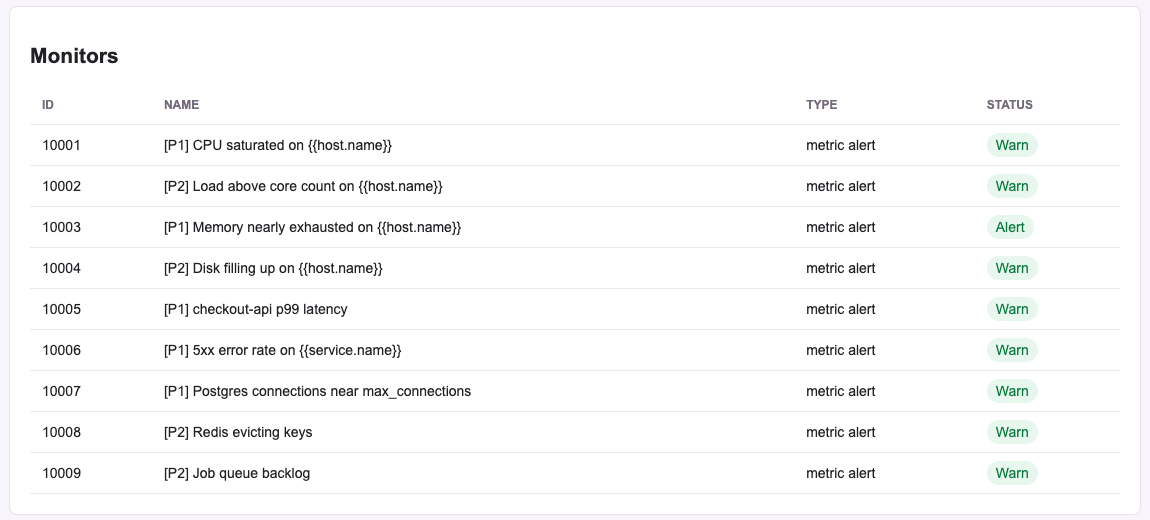
/ui.第 1 次运行高峰,18:45:41。孪生服务 /ui 上 1 个 ALERT、8 个 WARN。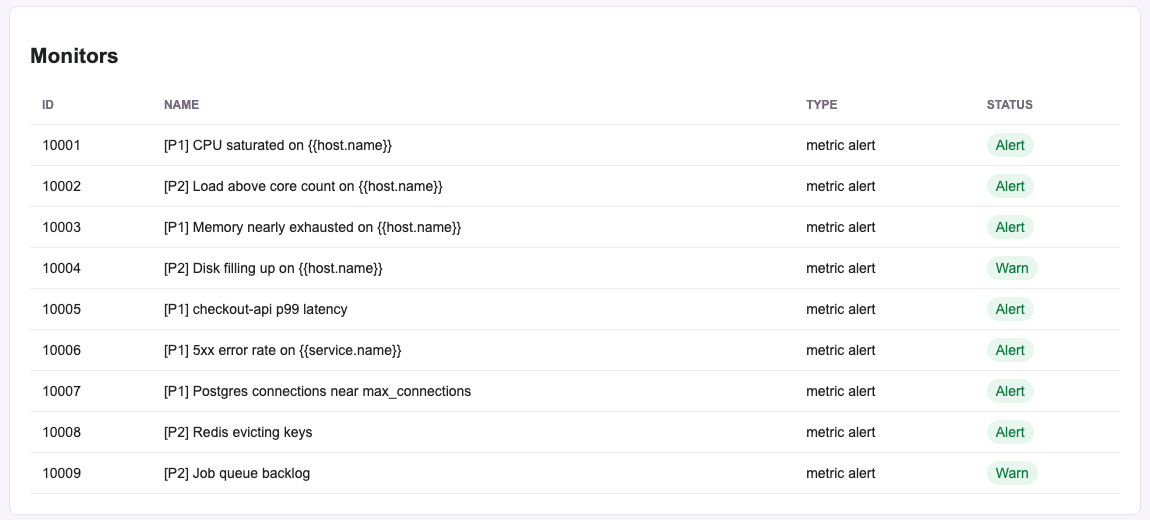
How our scenario held up我们的场景表现如何
The scenario is a prod fleet of twelve hosts: four storefront web boxes, four checkout-api boxes, a Postgres primary and replica, Redis and a job runner. It has 135 metric series and seven days of history at 5-minute resolution, plus the last six hours at 1-minute resolution. A live peak then streamed every 10 seconds. The week is a pure function of a seed, so the backfill and the live stream join into one series.
这个场景是一个由 12 台主机组成的生产集群:4 台 storefront 网页服务器、4 台 checkout-api 服务器、Postgres 主库和从库、Redis,以及一个任务执行器。共有 135 条指标序列:七天历史按 5 分钟精度回填,最近 6 小时按 1 分钟精度,之后每 10 秒实时推送一次高峰数据。整周数据完全由一个随机种子决定,所以回填和实时推送能无缝接成一条曲线。
The seeded week, read back from the twin注入的一周数据,从孪生服务读回
hottest host, system.cpu.user最热主机 · system.cpu.userToday's peak isn't in the backfill; it ran live, as charted above.
今天的高峰不在回填数据里,而是实时跑的,见上方图表。
| Promise承诺 | Evidence证据 | Result结果 |
|---|---|---|
| Hot around the clock全天高负载 | The quietest point of the seeded week has the hottest host at 75.8% CPU user. Before each live peak the twin showed 1 ALERT, 5–6 WARN and 2–3 OK.注入的一周里最平静的时刻,最热的主机 CPU 用户态占用仍有 75.8%。每次实时高峰之前,孪生服务显示 1 个 ALERT、5–6 个 WARN、2–3 个 OK。 | Held成立 |
| Nearly melts every day每天都差点崩溃 | Read back from the twin, max CPU around each seeded peak: 91.9, 92.0, 91.8, 91.8, 91.7, 91.9 and 91.8%. The CPU monitor's critical line is 90%.从孪生服务读回的每天高峰最大 CPU:91.9、92.0、91.8、91.8、91.7、91.9、91.8%。CPU 监控器的严重阈值是 90%。 | Held成立 |
| Never actually falls over从未真正宕机 | Live maximums across both runs: 92.0% CPU user and 498 of 500 Postgres connections, with every host reporting. 39 model tests keep busy CPU under 99.5%, connections under 500 and free memory over 1.5%.两次运行的实时最大值:CPU 用户态 92.0%,Postgres 连接 498/500,所有主机持续上报。39 个模型测试保证 CPU 繁忙度低于 99.5%、连接数低于 500、可用内存高于 1.5%。 | Held成立 |
| Alerts fire like a real bad day告警像真实的糟糕一天那样触发 | Run 1 held the peak 2.4 minutes, and 5xx and Postgres never reached ALERT. Run 2 held 7 minutes, with 7 of 9 monitors in ALERT and disk and job backlog in WARN as designed.第 1 次运行高峰只停留 2.4 分钟,5xx 和 Postgres 都没到 ALERT。第 2 次停留 7 分钟,9 个监控器中 7 个进入 ALERT,磁盘和任务积压按设计停在 WARN。 | Fixed in run 2第 2 次已修复 |
| The story matches the numbers故事和数字对得上 | Events, logs and incidents are written from the same model values. The OOM event names the api host with the least free memory, and incident titles quote the modeled p99 and 5xx.事件、日志和事故都由同一套模型数值生成。OOM 事件点名的是可用内存最少的 api 主机,事故标题引用的是模型里的 p99 和 5xx。 | By construction设计保证 |
| Repeatable可重复 | Same seed, same week. With the twin's fixed IDs, run 2 lined up with run 1 object for object.同一个种子,同一周数据。加上孪生服务的固定 ID,第 2 次运行和第 1 次逐个对象对齐。 | Held成立 |
| Readable by a person人能看懂 | The twin's UI shows counts and monitor states only. Reading the dashboard, events, logs and incidents took the API or our status command.孪生服务的界面只显示数量和监控器状态。要看仪表盘、事件、日志和事故,得用 API 或我们的 status 命令。 |
Limited by the twin受孪生服务限制 |
| Object对象 | Run 1第 1 次 | Run 2第 2 次 |
|---|---|---|
| Monitors监控器 | 9 | 9 |
| SLOs, dashboard, notebookSLO、仪表盘、笔记本 | 2, 1, 1 | 2, 1, 1 |
| Metric points (135 series)指标数据点(135 条序列) | 320,220 | 320,220 |
| Events (run 2 switched to the twin's monitor-event format)事件(第 2 次改用孪生服务的监控事件格式) | 72 | 79 |
| Log lines日志行 | 1,498 | 1,536 |
| Incidents事故 | 7 resolved + 1 live7 个已解决 + 1 个实时 | 7 resolved + 1 live7 个已解决 + 1 个实时 |
| Failed requests失败请求 | 0 | 0 |
What Arga gave us, and what we builtArga 给了我们什么,我们自己造了什么
From ArgaArga 提供的
- A hosted, Datadog-compatible API, ready in about 33 seconds托管的、兼容 Datadog 的 API,约 33 秒就绪
- Monitor evaluation with per-group state and its own transition events监控器评估,带分组状态和自己的状态切换事件
- Log search, an event stream, incidents, SLOs, dashboards and notebooks日志搜索、事件流、事故、SLO、仪表盘和笔记本
- Fixed IDs across runs, Swagger UI and a full OpenAPI spec跨运行固定的 ID、Swagger 界面和完整的 OpenAPI 规范
- An admin snapshot (20 MB for our seeded state) and a reset that worked管理快照(我们注入的状态有 20 MB)和可用的重置
- An MCP endpoint per twin, which we didn't test每个孪生服务一个 MCP 端点(我们没有测试)
From us · 1,911 lines我们写的 · 1,911 行
- fleet.py · 386
The load model: 12 hosts, 135 series, one week per seed负载模型:12 台主机、135 条序列,一个种子对应一周 - scenario.py · 594
9 monitors, a dashboard, SLOs, a runbook, the daily events, logs and incidents, and the window model9 个监控器、仪表盘、SLO、运维手册,每天的事件、日志、事故,以及窗口模型 - twin.py · 222
A Datadog client with v2-to-v1 fallback, retries and payload splittingDatadog 客户端:v2 自动回退 v1、重试、拆分请求体 - sim.py · 559
Provisioning through the arga CLI, seeding, live streaming, status通过 arga CLI 开通、注入数据、实时推送、状态查询 - test_fleet.py · 150
39 tests on the model's invariants39 个针对模型不变量的测试
Where an adjacent product can win相邻产品可以在哪里胜出
Scenario packs for observability twins可观测性孪生服务的场景包
What we saw我们看到的Arga's scenario seeding covers 18 twins, from Slack to Salesforce. Datadog isn't one of them. One believable week took 320,220 generated points and 79 events written in code.Arga 的场景注入覆盖 18 个孪生服务,从 Slack 到 Salesforce,但不包括 Datadog。为了一周可信的数据,我们用代码生成了 320,220 个数据点和 79 个事件。
The move可以怎么做Ship deterministic history generators as scenarios: daily saturation, a slow memory leak, a noisy neighbor, a bad deploy.把确定性的历史数据生成器直接做成场景:每日饱和、缓慢内存泄漏、吵闹的邻居、一次糟糕的发布。
Time you can control可控的时间
What we saw我们看到的A 10-minute twin with wall-clock monitors can't show a day passing. Our first live peak was too short for the alert windows.一个只活 10 分钟、监控器按真实时钟运行的孪生服务,展示不了一天的变化。我们第一次的实时高峰就因为太短,没能撑满告警窗口。
The move可以怎么做Window-aware backfill, compressed days and a documented virtual clock.理解告警窗口的回填、把一天压缩播放,以及有文档的虚拟时钟。
A strict mode严格模式
What we saw我们看到的The twin takes data Datadog rejects and returns event titles and incident lists Datadog wouldn't.孪生服务接受 Datadog 会拒绝的数据,返回的事件标题和事故列表也和 Datadog 不一样。
The move可以怎么做A switch that enforces Datadog's limits and shapes, so an agent that passes against the twin also passes in production.提供一个开关,强制执行 Datadog 的限制和数据格式,让在孪生服务上通过测试的 AI 代理,到了生产环境也能通过。
State a person can review人能审阅的状态
What we saw我们看到的The UI stops at counts and monitor states. Dashboards, events, logs and incidents live behind the API.界面只到数量和监控器状态为止,仪表盘、事件、日志和事故都藏在 API 后面。
The move可以怎么做Render dashboards, monitor timelines, logs and incidents, so a reviewer sees what the agent saw.把仪表盘、监控器时间线、日志和事故渲染出来,让审阅的人看到 AI 代理看到的东西。
Match these first先要追平的
- Monitor math faithful to the window and the 10-second tick忠实于时间窗口和 10 秒节拍的监控计算
- Breadth on the order of 900 API paths约 900 个 API 路径的覆盖面
- Ingest around 50,000 points a second每秒约 5 万个数据点的写入速度
- Fixed IDs across runs跨运行固定的 ID
- An MCP endpoint and an
llms.txtdocs indexMCP 端点和llms.txt文档索引
What we didn't test我们没有测试的部分
- The MCP endpoint and its toolsMCP 端点及其工具
- Fault injection and rate-limit headers故障注入和限流响应头
- Synthetic tests, downtimes and computed SLO status合成测试(Synthetics)、停机窗口(downtime)和 SLO 状态计算
/_admin/clock/advance- The cost, security, RUM and on-call paths成本、安全、RUM 和值班相关路径
- The other 39 twins in Arga's catalogArga 目录里的另外 39 个孪生服务
- Team-plan TTLs, up to 480 minutes团队套餐的存活时间(最长 480 分钟)
- Our simulator's compressed-day mode我们模拟器的压缩时间模式
Method and sources方法与来源
| Run运行 | Twin run ID孪生运行 ID | Requested发起请求 | Ready就绪 | Seeded注入完成 | Live until实时推送至 | Peak held高峰停留 |
|---|---|---|---|---|---|---|
| 1 | 8a7610b1-caea-4718-a4da-b7ca21b8754b | 18:40:39 | 18:41:14 | 18:41:33 | 18:50:53 | 18:44:31–18:46:56 |
| 2 | 5e6b8904-214a-4204-89c0-58c6e65c6347 | 18:51:05 | 18:51:37 | 18:51:50 | 19:01:21 | 18:53:00–19:00:00 |
- All times are PDT on Oct 19, 2026. Free plan, with a quickstart key good for 5 provisions; these runs used 2.所有时间均为 2026 年 10 月 19 日太平洋夏令时。免费套餐,快速入门密钥可开通 5 次,这两次运行用了 2 次。
- Model predictions come from
scenario.windowed_levelin~/arga-datadog-sim, fed the same points we sent the twin.模型预测来自~/arga-datadog-sim里的scenario.windowed_level,输入的是我们发给孪生服务的同一批数据点。 - Datadog's limits are quoted from its API reference:Datadog 的限制引自其 API 参考文档: Submit metrics, Post an event, Send logs.
- Arga facts come from its twin reference, scenarios and plans pages,
arga whoami, and the twin's own OpenAPI spec.Arga 的信息来自其孪生服务参考、场景和套餐页面、arga whoami命令,以及孪生服务自己的 OpenAPI 规范。 - Raw evidence (run logs, the twin's monitor events, its OpenAPI spec, screenshots) is in
~/arga-datadog-sim/state/.原始证据(运行日志、孪生服务的监控事件、OpenAPI 规范、截图)保存在~/arga-datadog-sim/state/。